Icon of program: PhoneClean

PhoneClean for Windows

  • Trial version
  • 2.7
    234
  • 66.9K
  • V5.6.0-20200923

Make sure your iPhone is always clean and protected

Although iOS is, theoretically, cleaner and more stable than Android, all systems inevitably accumulate garbage. And if you have an iPhone the fastest way to clean it is not from the device itself, but from your PC. Which is why you want PhoneClean, a Start-up Visa program with endless possibilities.

Top Recommended Alternative

Your iPhone and iPad will be cleaner than a whistle

As you use your iOS device it slowly fills with residual files. And it is not just WhatsApp photos or apps that you don’t use, but also operating and error files that are unnecessary and take up space. One way to free up this space is PhoneClean, a PC program that eliminates unnecessary files from your iOS device.

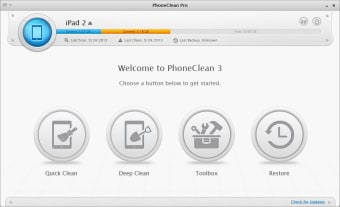
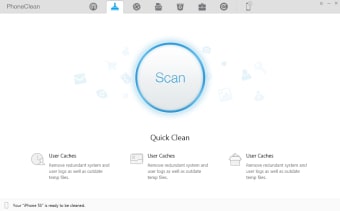
PhoneClean has several cleaning options: quick cleanup to clear cached apps, errors, and other temporary files; Internet cleaning to clear records; privacy cleaning, which removes sensitive data like call logs, traces of photos, and more; and the system cleaning, which erases files from apps that are no longer installed.

PhoneClean also has a toolbox to easily delete contacts, notes, photos, and other files and data.

Finally, there it has a Silent Clean option. This sees any iPhone or iPad you have connected to your home Wi-Fi and cleans it while it is not in use.

Accessible to all

To use PhoneClean you only need to connect your iPhone or iPad to your PC.

All of the options are clear, in a similar style to that of Android cleaners like Turbo Booster, so it is not difficult to master.

Improve the performance of any iOS device

PhoneClean is a really effective program that allows you to control almost every aspect of your Apple phone or tablet. From the first time you use it you'll notice that the performance of your iPhone or iPad improves considerably.

  • Pros

    • Easy to use
    • Modern looking design
    • Works quickly
    • Remote wipe option
    • Performance improvements from first use
  • Cons

    • Doesn't back up data
    • Doesn't provide details on deleted data
    • Not a native iOS tool
 0/2

App specs

Also available in other platforms

Program available in other languages


Icon of program: PhoneClean

PhoneClean for PC

  • Trial version
  • 2.7
    234
  • 66.9K
  • V5.6.0-20200923

User reviews about PhoneClean

2.7

3 reviews

Add review

Main reviews for you

  • Anonymous user

    Unreliable, deleted your photos.. PhoneClean deleted all my photos without notice and didn't restore properly.

  • Anonymous user

    It's very helpful. My phone can't take more picture in because there is not enough space and i don't want to removed my downloaded video et magazine. It is so frustrating ! So i searched for a cleaner to reclaim more space. I found phoneclean, very useful. I recommended to you!

  • Anonymous user

    Amazing iPhone Cleaning Tool. I have never known there are so many types of junk in iPhone. PhoneClean not only introduces those junk files, but gives me an access to each one of them. Bravo!

More

You may also like

Alternatives to PhoneClean

Explore Apps

Latest articles

Laws concerning the use of this software vary from country to country. We do not encourage or condone the use of this program if it is in violation of these laws.


Softonic

Is PhoneClean safe?

100/100

Score result: Clean

This file passed a comprehensive security scan using VirusTotal technology. It is safe to download.

  • Virus free
  • Spyware free
  • Malware free
  • Verified by Security Partners

    VirusTotal logo

Scan Info

Last scan
Monday, November 27, 2023
Scan provider
VirusTotal · Full report

File Integrity

File
phoneclean-en-setup.exe
SHA256
315443ddeb56ee2574342004de84c65030eefe0b109db63121b893963fdbcfe9
SHA1
40591b3739e4945748b110d5b5e22278b86842a7

Softonic security commitment

PhoneClean has been thoroughly scanned by our advanced security systems and verified by industry-leading partners. This file comes from the official developer and has passed all our security checks, showing no signs of viruses, malware, or spyware. For more information, visit our Security and Trust Center